XLSX → Markdown
Convert Excel to Markdown
Clean Markdown tables from XLSX files. Right in your browser, no upload.
100% in browserNo sign-upGDPR-compliantFree
Drop your file here or pick another format
Drop files here
or click to choose, up to 25 MB per file, several at once
PDF
Bilder
CSV/XLSX
DOCX
PPTX
HTML/MD
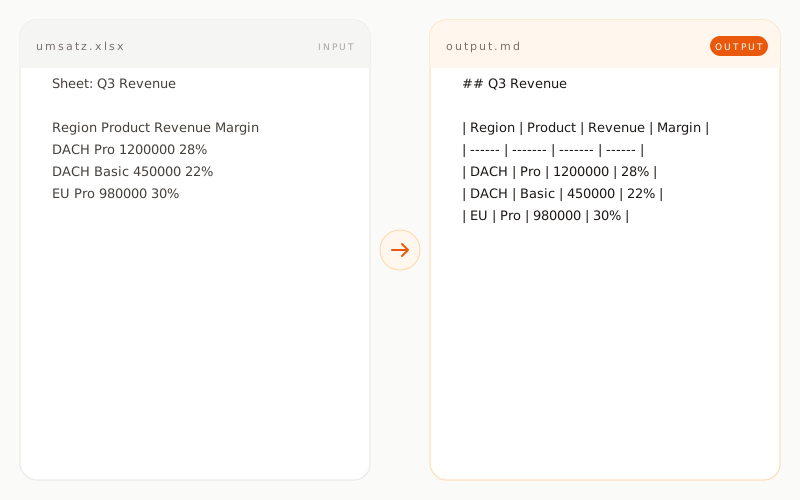
Example: Excel to Markdown
revenue.xlsxINPUT
Sheet: Q3 Revenue

Region   Product    Revenue  Margin
DACH     Pro        1200000  28%
DACH     Basic      450000   22%
EU       Pro        980000   30%
EU       Basic      320000   24%

[Chart: Revenue by region]
revenue.mdOUTPUT
## Q3 Revenue

| Region | Product | Revenue | Margin |
| ------ | ------- | ------- | ------ |
| DACH   | Pro     | 1200000 | 28%    |
| DACH   | Basic   | 450000  | 22%    |
| EU     | Pro     | 980000  | 30%    |
| EU     | Basic   | 320000  | 24%    |
How does Excel conversion work?
01 / TYPE A
XLSX is read cell by cell
SheetJS pulls the values out of each cell right in the browser. Data types like numbers, dates and text are recognized and rendered correctly inside the Markdown table.
02 / TYPE B
Multiple sheets are handled
Every worksheet becomes its own Markdown table with the sheet name as an H2 heading above it. The structure of a workbook stays readable in Markdown.
03 / TYPE C
Formulas are evaluated
Excel computes values when saving, and the tool takes the resulting number rather than the formula itself. You always get the final figures you or an LLM can work with.
What is preserved, what is not?
preserved transformed removed
Cell content
text and numbers preserved
Sheet structure
each sheet as its own table
Header rows
carried over as table headers
Formulas
taken as computed value
Merged cells
split into individual cells
Cell formatting
colors and borders removed
Charts
not converted
Pivot tables
not converted
Images inside cells
not converted
When is Excel to Markdown conversion useful?