DOCX → Markdown
Convert Word to Markdown
Clean, LLM-optimized Markdown from DOCX files. Right in your browser, no upload.
100% in browserNo sign-upGDPR-compliantFree
Drop your file here or pick another format
Drop files here
or click to choose, up to 25 MB per file, several at once
PDF
Bilder
CSV/XLSX
DOCX
PPTX
HTML/MD
Example: Word to Markdown
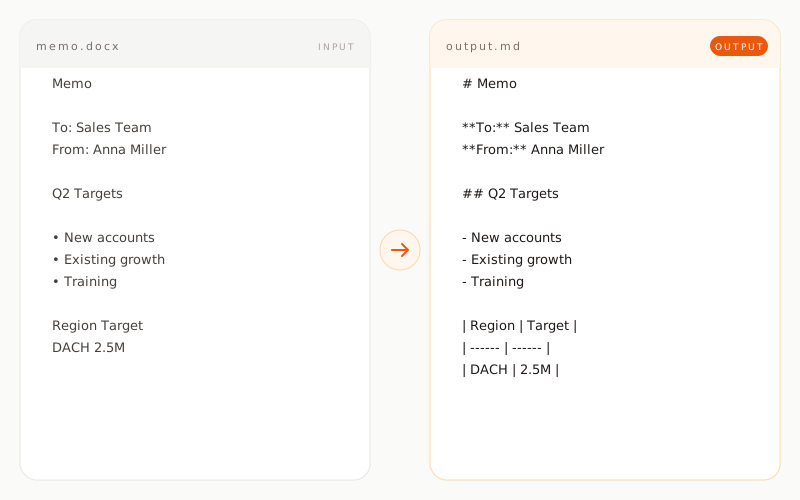
memo.docxINPUT
Memo

To: Sales Team
From: Anna Miller
Date: March 15, 2025

Q2 Targets

We focus on:
• Acquiring mid-market customers
• Growing existing accounts
• Sales team training

Region    Target
DACH      2.5M
EU        1.2M
memo.mdOUTPUT
# Memo

**To:** Sales Team
**From:** Anna Miller
**Date:** March 15, 2025

## Q2 Targets

We focus on:

- Acquiring mid-market customers
- Growing existing accounts
- Sales team training

| Region | Target |
| ------ | ------ |
| DACH   | 2.5M   |
| EU     | 1.2M   |
How does Word conversion work?
01 / TYPE A
Direct DOCX parsing
A DOCX file is essentially a ZIP package containing XML. The tool reads that XML structure right in your browser through the Mammoth library and pulls out the content and semantic styles without needing Word installed.
02 / TYPE B
Formatting is mapped to semantics
Word styles like Heading 1 become H1, bold becomes **, italic becomes *. Purely visual settings such as fonts and colors are intentionally dropped because Markdown is a semantic format.
03 / TYPE C
Tables and lists keep their structure
Word tables are rebuilt as proper Markdown tables. Numbered and bulleted lists keep their indentation and nesting across multiple levels.
What is preserved, what is not?
preserved transformed removed
Headings
preserved as H1, H2, H3
Bold and italic
preserved as ** and *
Lists
preserved as Markdown lists
Tables
preserved as Markdown tables
Footnotes
preserved as Markdown footnotes
Links
preserved as Markdown links
Embedded images
noted as references
Fonts and colors
removed, Markdown is semantic
Headers and footers
removed
Comments and tracked changes
removed
When is Word to Markdown conversion useful?