HTML → Markdown
Convert HTML to Markdown
Clean Markdown from HTML files or HTML source. Right in your browser, no upload.
100% in browserNo sign-upGDPR-compliantFree
Drop your file here or pick another format
Drop files here
or click to choose, up to 25 MB per file, several at once
PDF
Bilder
CSV/XLSX
DOCX
PPTX
HTML/MD
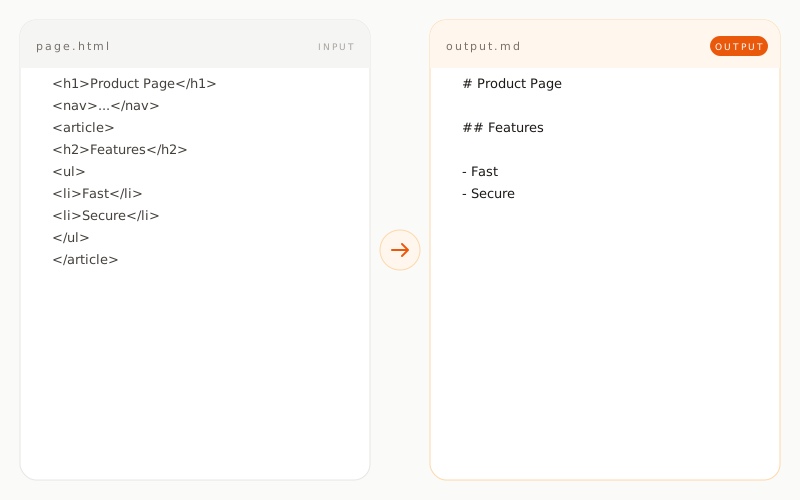
Example: HTML to Markdown
article.htmlINPUT
<article>
  <h1>Working efficiently with LLMs</h1>
  <p>Using <strong>structured data</strong> saves time.</p>
  <ul>
    <li>Markdown over PDF</li>
    <li>Clear headings</li>
    <li>Short paragraphs</li>
  </ul>
  <a href="/guide">Read the guide</a>
</article>article.mdOUTPUT
# Working efficiently with LLMs

Using **structured data** saves time.

- Markdown over PDF
- Clear headings
- Short paragraphs

[Read the guide](/guide)
How does HTML conversion work?
01 / TYPE A
HTML tags become Markdown
h1 becomes #, strong becomes **, ul with li becomes a list with -. The converter follows the semantic rules of HTML and translates them to the corresponding Markdown equivalent.
02 / TYPE B
Scripts and styles are removed
JavaScript, CSS and inline styles are ignored entirely. What remains is the semantic content structure, which is exactly what an LLM actually needs.
03 / TYPE C
Images and links are preserved
img tags become Markdown image references with alt text, a tags become Markdown links including the target URL. The linking structure of the original page is kept.
What is preserved, what is not?
preserved transformed removed
Headings h1 through h6
preserved as # through ######
Paragraphs
preserved as Markdown paragraphs
Lists
preserved as Markdown lists
Tables
preserved as Markdown tables
Images
preserved as image references
Links
preserved as Markdown links
Bold, italic, code
preserved as **, *, `
Scripts, styles, inline CSS
removed
Iframes and embedded videos
removed
When is HTML to Markdown conversion useful?