PPTX → Markdown
Convert PowerPoint to Markdown
Clean Markdown from PPTX files. Each slide structured as a section. Right in your browser.
100% in browserNo sign-upGDPR-compliantFree
Drop your file here or pick another format
Drop files here
or click to choose, up to 25 MB per file, several at once
PDF
Bilder
CSV/XLSX
DOCX
PPTX
HTML/MD
Example: PowerPoint to Markdown
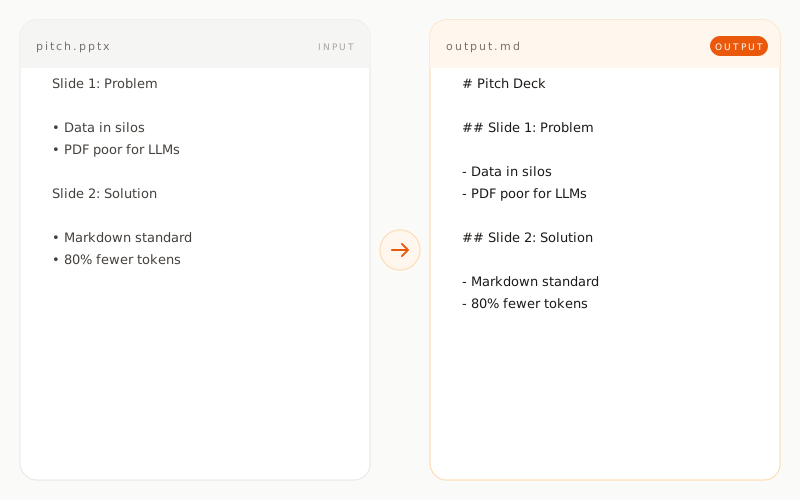
pitch.pptxINPUT
Slide 1
Product Vision 2026

• A platform for knowledge work
• AI-native from day one
• Focus on the DACH market

Slide 2
Roadmap

• Q1: Beta with 50 customers
• Q2: Public launch
• Q3: API for partners
pitch.mdOUTPUT
## Slide 1: Product Vision 2026

- A platform for knowledge work
- AI-native from day one
- Focus on the DACH market

## Slide 2: Roadmap

- Q1: Beta with 50 customers
- Q2: Public launch
- Q3: API for partners
How does PowerPoint conversion work?
01 / TYPE A
PPTX is parsed slide by slide
Each slide is read individually from the PPTX container. The slide order is preserved, so the storyline of the presentation stays intact in the Markdown output.
02 / TYPE B
Titles become headings
Slide titles become H2, subtitles become H3. A presentation turns into a hierarchically structured Markdown document that LLMs can use as a content outline.
03 / TYPE C
Bullet lists and tables stay structured
Bullets on slides come over as Markdown lists, including nested levels. Tables stay as proper Markdown tables.
What is preserved, what is not?
preserved transformed removed
Slide titles
preserved as H2
Bullet lists
preserved as Markdown lists
Slide text
preserved as paragraphs
Tables
preserved as Markdown tables
Slide order
preserved in sequence
Speaker notes
optional, as quote block
Images and charts
not converted
Animations and transitions
not converted
Master slide design
not converted
When is PowerPoint to Markdown conversion useful?