Convert PDF to Markdown
Clean, LLM-optimized Markdown from PDF files. Right in your browser, no upload.
PDF, other formats also supported
Drop files here
or click to choose, up to 25 MB per file, several at once
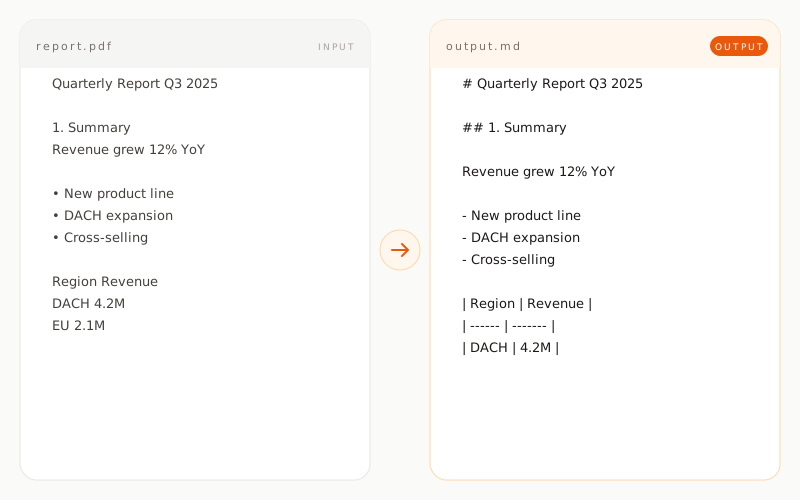
Example: PDF to Markdown
Quarterly Report Q3 2025

1. Summary
Revenue grew 12% year over year.
Key drivers:
• New product line
• DACH expansion
• Cross-selling

Region    Revenue
DACH      4.2M
EU        2.1M
# Quarterly Report Q3 2025

## 1. Summary

Revenue grew 12% year over year.

Key drivers:

- New product line
- DACH expansion
- Cross-selling

| Region | Revenue |
| ------ | ------- |
| DACH   | 4.2M    |
| EU     | 2.1M    |
How does PDF conversion work?
Text-based PDFs
For digitally generated PDFs, the embedded text stream is read directly. This is fast, accurate and lossless. Fonts, sizes and colors are intentionally discarded because Markdown is a semantic format. What remains are headings, paragraphs, lists and tables in a form that language models like Claude, ChatGPT or Gemini can process directly. A typical 20-page PDF converts in under two seconds, fully in the browser.
Scanned PDFs
If a PDF only contains images, meaning it was scanned, the tool detects this automatically and runs OCR via Tesseract. OCR runs completely in your browser through WebAssembly. No data is sent to any server. Recognition quality depends heavily on scan resolution and source language. Clean scans at 300 DPI or higher typically achieve over 95 percent accuracy. Handwritten notes are not recognized reliably.
Multi-column layouts and tables
Scientific papers, magazines and reports often use multiple columns. The tool linearizes such layouts into a logical reading order from top to bottom, so the Markdown output reads coherently. Tables are reconstructed as proper Markdown tables as long as column structure and cell boundaries are detectable. For very complex, nested tables, simplifications may occur. A brief visual check of the output is recommended in such cases.
What is preserved, what is not?
When is PDF to Markdown conversion useful?